
Automatisch The SEO Framework-Metadaten für Bricks mit Claude erstellen
Claude verwenden, um automatisch SEO Framework-Metadaten aus dem Inhalt von Bricks-Textelementen zu generieren






Wir können Claude mit der Bricks-Erweiterung verwenden, um The SEO Framework-Metadaten aus dem Inhalt von Bricks-Textelementen zu generieren – alles mit einer einzigen Gato GraphQL-Query.
Und mit der Automation-Erweiterung können wir die Ausführung dieser Query automatisch auslösen, wenn eine neue Bricks-Seite veröffentlicht wird.
Diese Query verwendet Claude, um den Inhalt der Bricks-Textelemente zu analysieren und The SEO Framework-Metadaten (Titel und Beschreibung) für besseres SEO zu generieren.
Wir müssen die folgenden Variablen angeben:
customPostId: Die ID des zu aktualisierenden Bricks-Custom-PostsanthropicAPIKey: Der API-Schlüssel für die Anthropic-API
Du kannst die Systemnachricht und die Prompt-Vorlage anpassen, um zu steuern, wie Claude die Metadaten generiert.
Speichere die Query als neue Persisted Query mit dem Titel "Create The SEO Framework metadata for Bricks with Claude", damit wir sie in der Automation verwenden können (siehe unten).
Hier ist die GraphQL-Query:
query InitializeGlobalVariables
@configureWarningsOnExportingDuplicateVariable(enabled: false)
{
emptyArray: _echo(value: [])
@export(as: "elementTexts")
@remove
}
query GetBricksData($customPostId: ID!)
@depends(on: "InitializeGlobalVariables")
{
customPost(by:{ id: $customPostId }, status: any) {
id
title
bricksData(filterBy: { include: ["heading", "text"] })
@underEachArrayItem
@underJSONObjectProperty(by: { path: "settings.text" })
@export(as: "elementTexts")
}
}
query GenerateMetadataWithClaude(
$anthropicAPIKey: String!
$maxTokens: Int! = 32000
$promptTemplate: String! = """
You are an SEO expert specializing in metadata optimization.
I need to generate SEO metadata for a WordPress page using The SEO Framework plugin.
Based on the following content from the page, please generate:
1. A compelling SEO title (max 60 chars)
2. A meta description (max 160 chars)
Please respond in JSON format with this structure:
{
"title": "SEO title here",
"description": "Meta description here"
}
Return ONLY the JSON object. Do not include any explanations, markdown formatting, or code blocks. The response must be a valid JSON object starting with { and ending with }.
Content to analyze:
{$encodedContent}
"""
$model: String! = "claude-sonnet-4-0"
)
@depends(on: "GetBricksData")
{
encodedContent: _arrayJoin(
array: $elementTexts,
separator: "\n\n"
)
prompt: _strReplace(
search: "{$encodedContent}",
replaceWith: $__encodedContent,
in: $promptTemplate
)
claudeResponse: _sendJSONObjectItemHTTPRequest(input: {
url: "https://api.anthropic.com/v1/messages",
method: POST,
options: {
headers: [
{
name: "x-api-key",
value: $anthropicAPIKey
},
{
name: "anthropic-version",
value: "2023-06-01"
}
],
json: {
model: $model,
max_tokens: $maxTokens,
messages: [
{
role: "user",
content: $__prompt
}
],
}
}
})
@underJSONObjectProperty(by: { key: "content" })
@underArrayItem(index: 0)
@underJSONObjectProperty(by: { key: "text" })
@export(as: "jsonEncodedMetadata")
}
query ExtractMetadata
@depends(on: "GenerateMetadataWithClaude")
{
jsonEncodedMetadata: _echo(value: $jsonEncodedMetadata)
@remove
decodedMetadata: _strDecodeJSONObject(string: $jsonEncodedMetadata)
seoMetadataTitle: _objectProperty(
object: $__decodedMetadata,
by: { key: "title" }
)
@export(as: "seoMetadataTitle")
seoMetadataDescription: _objectProperty(
object: $__decodedMetadata,
by: { key: "description" }
)
@export(as: "seoMetadataDescription")
}
mutation UpdateSEOFrameworkMetadata($customPostId: ID!)
@depends(on: "ExtractMetadata")
{
updateCustomPost(
input: {
id: $customPostId
meta: {
_genesis_title: [$seoMetadataTitle],
_genesis_description: [$seoMetadataDescription],
_open_graph_title: [$seoMetadataTitle],
_open_graph_description: [$seoMetadataDescription],
_twitter_title: [$seoMetadataTitle],
_twitter_description: [$seoMetadataDescription],
}
}
) {
status
errors {
__typename
...on ErrorPayload {
message
}
}
customPost {
id
metaTitle: metaValue(key: "_genesis_title")
metaDesc: metaValue(key: "_genesis_description")
socialTitle: metaValue(key: "_open_graph_title")
socialDesc: metaValue(key: "_open_graph_description")
twitterTitle: metaValue(key: "_twitter_title")
twitterDesc: metaValue(key: "_twitter_description")
}
}
}Die Variablen würden so aussehen:
{
"customPostId": 123,
"anthropicAPIKey": "sk-ant-..."
}Automation
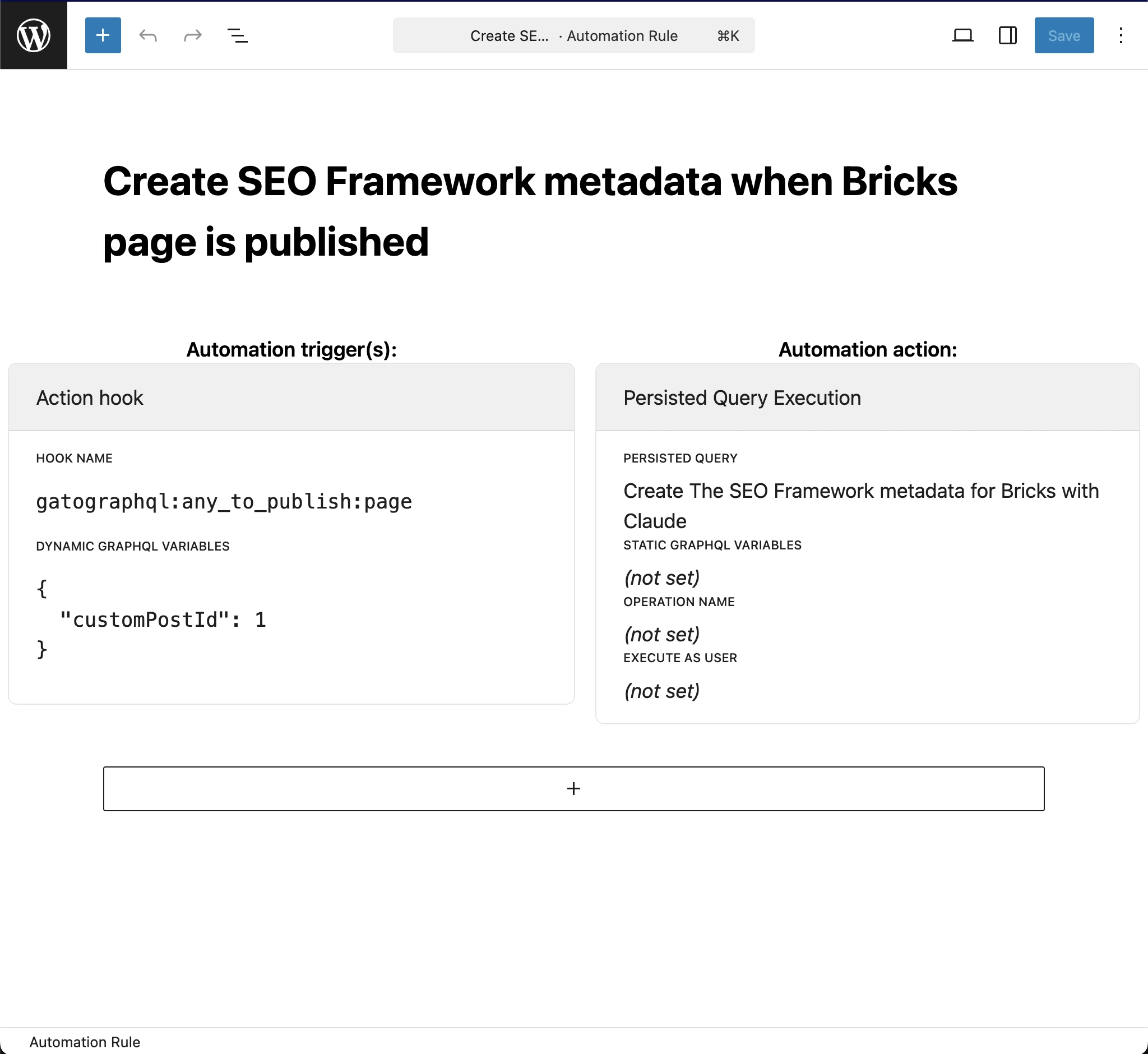
Um die Ausführung der Query automatisch auszulösen, wenn eine neue Bricks-Seite veröffentlicht wird, erstelle eine neue Automation-Regel mit den folgenden Einstellungen:
- Persisted Query:
"Create The SEO Framework metadata for Bricks with Claude"(also die, die wir oben erstellt haben) - Hook name:
gatographql:any_to_publish:page - Dynamic GraphQL variables:
{
"customPostId": 1
}