

JetEngine CCTS
Integration mit dem Plugin JetEngine von Crocoblock.
Das GraphQL-Schema stellt Felder bereit, um Custom Content Type (CCT)-Daten abzufragen.
Root-Felder
| Feld | Beschreibung |
|---|---|
jetengineCCTEntries | Gibt eine Liste von CCT-Einträgen zurück (Typ JetEngineCCTEntry). |
jetengineCCTEntryCount | Gibt die Anzahl der CCT-Einträge zurück. |
jetengineCCTEntry | Gibt einen einzelnen CCT-Eintrag zurück (Typ JetEngineCCTEntry). |
Der CCT-Slug muss über das Argument slug angegeben werden (der CCT muss in den Plugin-Einstellungen als abfragbar konfiguriert sein, siehe unten).
Typ JetEngineCCTEntry
Beim Typ JetEngineCCTEntry können Feldwerte wie folgt abgefragt werden:
| Feld | Beschreibung |
|---|---|
id | Die Datenbank-ID des Eintrags. |
uniqueID | Ein eindeutiger Bezeichner für den Eintrag, zusammengesetzt aus dem CCT-Slug und der ID des Eintrags. |
cctSlug | Der Slug des CCT, zu dem dieser Eintrag gehört. |
status | Der Status des Eintrags (z. B. publish, draft). |
createdDate | Erstellungsdatum des Eintrags. |
createdDateStr | Das Erstellungsdatum des Eintrags, formatiert als Zeichenkette. |
modifiedDate | Datum der letzten Änderung des Eintrags. |
modifiedDateStr | Das Datum der letzten Änderung des Eintrags, formatiert als Zeichenkette. |
authorID | Die ID des Autors des Eintrags. |
author | Das Verbindungsobjekt des Autors. |
singleCustomPostID | Die ID des verknüpften einzelnen Custom Posts, falls vorhanden. |
singleCustomPost | Das Verbindungsobjekt des verknüpften einzelnen Custom Posts. |
fieldValues | Ein JSON-Objekt mit allen CCT-Feldern für diesen Eintrag. |
fieldValue(slug) | Um ein einzelnes Feld per Slug abzufragen. |
CCT-Feldwerte
Die Werte von fieldValue(slug) und jedes Schlüssels in fieldValues werden gemäß dem im CCT definierten Feldtyp konvertiert.
Implizite ID-Felder (immer als int konvertiert, wenn vorhanden und nicht leer): id, singleCustomPostID, authorID.
Wie jeder CCT-Feldtyp in der GraphQL-Antwort konvertiert wird:
float bei Dezimalpunkt; sonst int.true für 1, true, yes, on (Groß-/Kleinschreibung wird ignoriert).int; "Both" → Objekt { id, url }; sonst unverändert.int[].int; mehrere → int[].Das folgende Beispiel verwendet einen CCT mit dem Slug "sample_cct" und Feldern verschiedener Typen (text, number, gallery usw.).
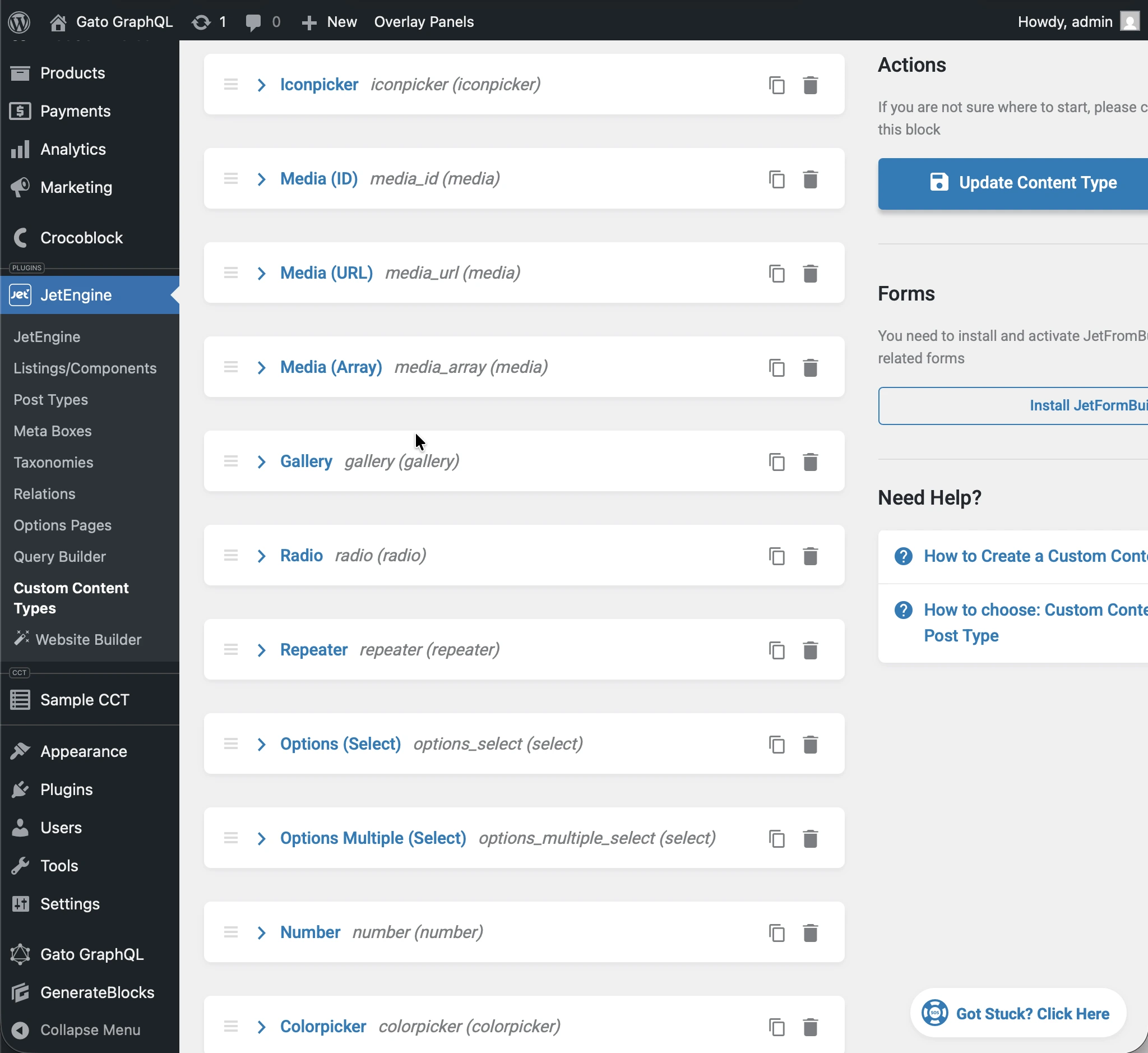
Wenn du folgende query ausführst:
query JetEngineCCTEntries {
jetengineCCTEntry(cctSlug: "sample_cct", by: { id: 1 }) {
label_text: fieldValue(slug: "label_text")
textarea: fieldValue(slug: "textarea")
date: fieldValue(slug: "date")
time: fieldValue(slug: "time")
datetime: fieldValue(slug: "datetime")
wysisyg: fieldValue(slug: "wysisyg")
switcher: fieldValue(slug: "switcher")
checkbox: fieldValue(slug: "checkbox")
checkbox_array: fieldValue(slug: "checkbox_array")
iconpicker: fieldValue(slug: "iconpicker")
media_id: fieldValue(slug: "media_id")
media_url: fieldValue(slug: "media_url")
media_array: fieldValue(slug: "media_array")
gallery: fieldValue(slug: "gallery")
radio: fieldValue(slug: "radio")
repeater: fieldValue(slug: "repeater")
options_select: fieldValue(slug: "options_select")
options_multiple_select: fieldValue(slug: "options_multiple_select")
number: fieldValue(slug: "number")
colorpicker: fieldValue(slug: "colorpicker")
post: fieldValue(slug: "post")
posts: fieldValue(slug: "posts")
}
}...wird jedes Feld in der Antwort in seinen CCT-Typ konvertiert:
{
"data": {
"jetengineCCTEntry": {
"label_text": "Some label",
"textarea": "Some description here\r\n\r\nSome description there",
"date": "2026-01-24",
"time": "09:13",
"datetime": "2026-03-07T08:00",
"wysisyg": "<p>Some <strong>description</strong> here</p>\n<p><em>Some description</em> there</p>\n<p>Some <a href=\"https://gatoplugins.com\">link</a></p>\n",
"switcher": true,
"checkbox": {
"one": true,
"two": false,
"three": true
},
"checkbox_array": [
"one",
"two"
],
"iconpicker": "fa fa-road",
"media_id": 1362,
"media_url": "https://gatographql.com/wp-content/uploads/GatoGraphQL-logo.webp",
"media_array": {
"id": 1380,
"url": "https://gatographql.com/wp-content/uploads/Funny-Dog.jpg"
},
"gallery": [
1361,
1362,
1363
],
"radio": "1",
"repeater": [
{
"label_(text)": "First item in repeater",
"date": "2026-01-17",
"time": "11:00",
"datetime": "2026-01-16T11:16",
"textarea": "Gato GraphQL provides a multitude of interactive clients,",
"wysiwyg": "<p>Gato GraphQL provides a <strong>multitude of interactive clients</strong>, and a user interface based on the <a href=\"https://wordpress.org\">WordPress editor</a>, so that anybody can operate it, whether a developer or not.</p>\n",
"switcher": true,
"iconpicker": "fa fa-inbox",
"media_id": 1361,
"media_url": "https://gatographql.com/wp-content/uploads/Funny-Dog.jpg",
"media_array": {
"id": 1380,
"url": "https://gatographql.com/wp-content/uploads/Funny-Dog.jpg"
},
"gallery": [
1363,
1361
],
"radio": "two",
"options_select": "three",
"options_multiple_select": [
"two",
"four"
],
"number": 22,
"colorpicker": "#757575",
"post": 1140,
"posts": [
1,
2
]
},
{
"label_(text)": "Second item in repeater",
"date": "2026-01-15",
"time": "00:18",
"datetime": "2026-01-18T00:00",
"textarea": "These clients make it very easy to interact with Gato GraphQL",
"wysiwyg": "<p>These clients <strong>make it very easy to interact with Gato GraphQL</strong>, directly within the <em>wp-admin</em> (and without the need of any PHP code), reducing friction and removing barriers so that anyone (developers and non-developers alike) can use it.</p>\n",
"switcher": false,
"iconpicker": "fa fa-search-plus",
"media_id": 1362,
"media_url": "https://gatographql.com/wp-content/uploads/LICENSE.txt",
"media_array": {
"id": 1363,
"url": "https://gatographql.com/wp-content/uploads/LICENSE.txt"
},
"gallery": [
1380,
1361,
1362
],
"radio": "three",
"options_select": "three",
"options_multiple_select": [
"three"
],
"number": 4469,
"colorpicker": "#2d2270",
"post": 2,
"posts": [
1688,
1682
]
}
],
"options_select": "1",
"options_multiple_select": [
"one",
"two",
"five"
],
"number": 66778899,
"colorpicker": "#721abf",
"post": 1,
"posts": [
1140,
1113
]
}
}
}Dieselbe Typkonvertierung gilt für jedes Feld im von fieldValues zurückgegebenen JSON:
query JetEngineCCTEntries {
jetengineCCTEntry(cctSlug: "sample_cct", by: { id: 1 }) {
fieldValues
}
}...was zurückgibt:
{
"data": {
"jetengineCCTEntry": {
"fieldValues": {
"label_text": "Some label",
"textarea": "Some description here\r\n\r\nSome description there",
"date": "2026-01-24",
"time": "09:13",
"datetime": "2026-03-07T08:00",
"wysisyg": "<p>Some <strong>description</strong> here</p>\n<p><em>Some description</em> there</p>\n<p>Some <a href=\"https://gatoplugins.com\">link</a></p>\n",
"switcher": true,
"checkbox": {
"one": true,
"two": false,
"three": true
},
"checkbox_array": [
"one",
"two"
],
"iconpicker": "fa fa-road",
"media_id": 1362,
"media_url": "https://gatographql.com/wp-content/uploads/GatoGraphQL-logo.webp",
"media_array": {
"id": 1380,
"url": "https://gatographql.com/wp-content/uploads/Funny-Dog.jpg"
},
"gallery": [
1361,
1362,
1363
],
"radio": "1",
"repeater": [
{
"label_(text)": "First item in repeater",
"date": "2026-01-17",
"time": "11:00",
"datetime": "2026-01-16T11:16",
"textarea": "Gato GraphQL provides a multitude of interactive clients,",
"wysiwyg": "<p>Gato GraphQL provides a <strong>multitude of interactive clients</strong>, and a user interface based on the <a href=\"https://wordpress.org\">WordPress editor</a>, so that anybody can operate it, whether a developer or not.</p>\n",
"switcher": true,
"iconpicker": "fa fa-inbox",
"media_id": 1361,
"media_url": "https://gatographql.com/wp-content/uploads/Funny-Dog.jpg",
"media_array": {
"id": 1380,
"url": "https://gatographql.com/wp-content/uploads/Funny-Dog.jpg"
},
"gallery": [
1363,
1361
],
"radio": "two",
"options_select": "three",
"options_multiple_select": [
"two",
"four"
],
"number": 22,
"colorpicker": "#757575",
"post": 1140,
"posts": [
1,
2
]
},
{
"label_(text)": "Second item in repeater",
"date": "2026-01-15",
"time": "00:18",
"datetime": "2026-01-18T00:00",
"textarea": "These clients make it very easy to interact with Gato GraphQL",
"wysiwyg": "<p>These clients <strong>make it very easy to interact with Gato GraphQL</strong>, directly within the <em>wp-admin</em> (and without the need of any PHP code), reducing friction and removing barriers so that anyone (developers and non-developers alike) can use it.</p>\n",
"switcher": false,
"iconpicker": "fa fa-search-plus",
"media_id": 1362,
"media_url": "https://gatographql.com/wp-content/uploads/LICENSE.txt",
"media_array": {
"id": 1363,
"url": "https://gatographql.com/wp-content/uploads/LICENSE.txt"
},
"gallery": [
1380,
1361,
1362
],
"radio": "three",
"options_select": "three",
"options_multiple_select": [
"three"
],
"number": 4469,
"colorpicker": "#2d2270",
"post": 2,
"posts": [
1688,
1682
]
}
],
"options_select": "1",
"options_multiple_select": [
"one",
"two",
"five"
],
"number": 66778899,
"colorpicker": "#721abf",
"post": 1,
"posts": [
1140,
1113
]
}
}
}
}Zugriff auf CCTs gewähren
Standardmäßig sind keine CCTs abfragbar.
Um einem CCT Zugriff zu gewähren, muss dieser in den Plugin-Einstellungen als abfragbar konfiguriert werden.
Es gibt 2 Stellen, an denen diese Konfiguration vorgenommen werden kann, in Prioritätsreihenfolge:
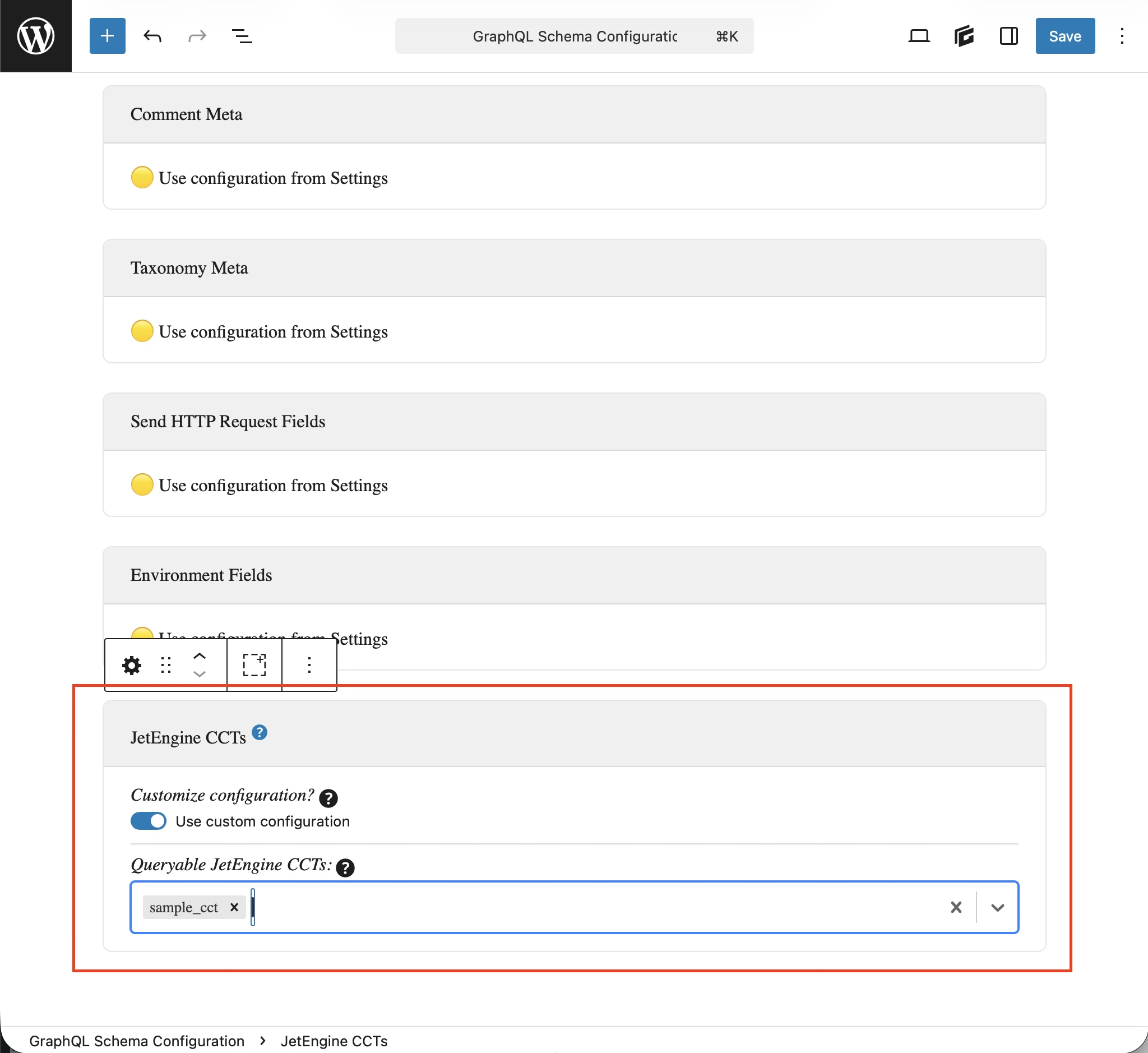
- Benutzerdefiniert: In der entsprechenden Schema-Konfiguration
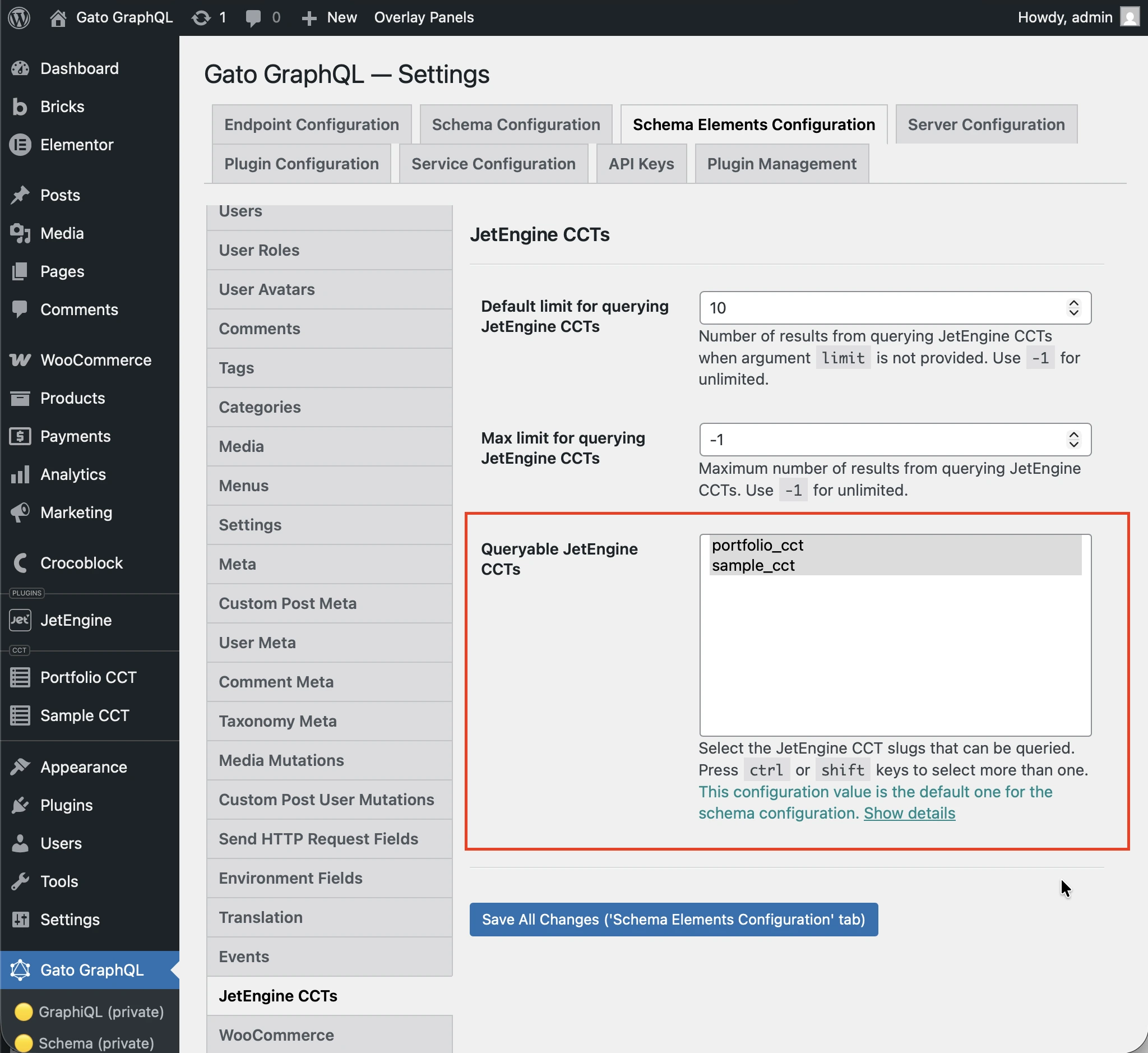
- Allgemein: Auf der Einstellungsseite
Wähle in der auf den Endpunkt angewendeten Schema-Konfiguration die Option Benutzerdefinierte Konfiguration verwenden und gib dann die gewünschten Einträge ein:
Andernfalls werden die in der Option Queryable JetEngine CCTS im Abschnitt JetEngine CCTS der Einstellungen definierten Einträge verwendet:
Beispiel-Queries
CCT-Einträge auflisten:
query {
jetengineCCTEntries(cctSlug: "sample_cct") {
id
uniqueID
cctSlug
status
createdDate
modifiedDate
authorID
author {
id
name
}
singleCustomPostID
singleCustomPost {
id
title
}
fieldValues
someField: fieldValue(slug: "some_field_slug")
}
}Einzelner CCT-Eintrag per Slug und ID:
query {
jetengineCCTEntry(cctSlug: "sample_cct", by: { id: 1 }) {
id
uniqueID
cctSlug
status
createdDate
modifiedDate
author {
id
name
}
singleCustomPost {
id
title
}
fieldValues
someField: fieldValue(slug: "some_field_slug")
}
}CCT-Einträge mit Filter, Paginierung und Sortierung auflisten und zählen:
query {
jetengineCCTEntryCount(
cctSlug: "sample_cct"
filter: { search: [{ field: "cct_author_id", value: 1, operator: EQUALS }] }
)
jetengineCCTEntries(
cctSlug: "sample_cct"
filter: { search: [{ field: "cct_author_id", value: 1, operator: EQUALS }] }
pagination: { limit: 10, offset: 0 }
sort: { by: "cct_created", order: DESC }
) {
id
authorID
}
}