

(Gutenberg) Bloecke
So kannst du Gutenberg-Block-Daten abrufen.
Das GraphQL-Schema hat folgende Felder zu allen CustomPost-Typen (wie Post und Page) hinzugefuegt:
blocksblockDataItemsblockFlattenedDataItems
Diese Felder sind nicht aktiviert, wenn das Plugin Classic Editor aktiv ist.
blocks
Das Feld CustomPost.blocks: [BlockUnion!] ruft die Liste aller Bloecke ab, die im Custom Post enthalten sind.
blocks gibt eine Liste der Block-Typen zurueck, die dem GraphQL-Schema zugeordnet wurden. Diese Block-Typen sind alle Teil des Typs BlockUnion und implementieren das Interface Block.
Das Plugin implementiert einen Block-Typ, GenericBlock, der bereits ausreicht, um die Daten fuer jeden Block abzurufen (ueber das Feld attributes: JSONObject).
Diese query:
{
post(by: { id: 1 }) {
blocks {
...on Block {
name
attributes
innerBlocks {
...on Block {
name
attributes
innerBlocks {
...on Block {
name
attributes
}
}
}
}
}
}
}
}
}...liefert diese Antwort:
{
"data": {
"post": {
"blocks": [
{
"name": "core/gallery",
"attributes": {
"linkTo": "none",
"className": "alignnone",
"images": [
{
"url": "https://d.pr/i/zd7Ehu+",
"alt": "",
"id": "1706"
},
{
"url": "https://d.pr/i/jXLtzZ+",
"alt": "",
"id": "1705"
}
],
"ids": [],
"shortCodeTransforms": [],
"imageCrop": true,
"fixedHeight": true,
"sizeSlug": "large",
"allowResize": false
},
"innerBlocks": null
},
{
"name": "core/heading",
"attributes": {
"content": "List Block",
"level": 2
},
"innerBlocks": null
},
{
"name": "core/list",
"attributes": {
"ordered": false,
"values": "<li>List item 1</li><li>List item 2</li><li>List item 3</li><li>List item 4</li>"
},
"innerBlocks": null
},
{
"name": "core/heading",
"attributes": {
"className": "has-top-margin",
"content": "Columns Block",
"level": 2
},
"innerBlocks": null
},
{
"name": "core/columns",
"attributes": {
"isStackedOnMobile": true
},
"innerBlocks": [
{
"name": "core/column",
"attributes": {},
"innerBlocks": [
{
"name": "core/image",
"attributes": {
"id": 1701,
"className": "layout-column-1",
"url": "https://d.pr/i/fW6V3V+",
"alt": ""
},
"innerBlocks": null
}
]
},
{
"name": "core/column",
"attributes": {},
"innerBlocks": [
{
"name": "core/paragraph",
"attributes": {
"className": "layout-column-2",
"content": "Phosfluorescently morph intuitive relationships rather than customer directed human capital.",
"dropCap": false
},
"innerBlocks": null
}
]
}
]
},
{
"name": "core/heading",
"attributes": {
"content": "Columns inside Columns (nested inner blocks)",
"level": 2
},
"innerBlocks": null
},
{
"name": "core/columns",
"attributes": {
"isStackedOnMobile": true
},
"innerBlocks": [
{
"name": "core/column",
"attributes": {},
"innerBlocks": [
{
"name": "core/image",
"attributes": {
"id": 1701,
"className": "layout-column-1",
"url": "https://d.pr/i/fW6V3V+",
"alt": ""
},
"innerBlocks": null
},
{
"name": "core/columns",
"attributes": {
"isStackedOnMobile": true
},
"innerBlocks": [
{
"name": "core/column",
"attributes": {
"width": "33.33%"
},
"innerBlocks": [
{
"name": "core/heading",
"attributes": {
"fontSize": "large",
"content": "Life is so rich",
"level": 2
},
"innerBlocks": null
},
{
"name": "core/heading",
"attributes": {
"level": 3,
"content": "Life is so dynamic"
},
"innerBlocks": null
}
]
},
{
"name": "core/column",
"attributes": {
"width": "66.66%"
},
"innerBlocks": [
{
"name": "core/paragraph",
"attributes": {
"content": "This rhyming poem is the spark that can reignite the fires within you. It challenges you to go out and live your life in the present moment as a “hero” and leave your mark on this world.",
"dropCap": false
},
"innerBlocks": null
},
{
"name": "core/columns",
"attributes": {
"isStackedOnMobile": true
},
"innerBlocks": [
{
"name": "core/column",
"attributes": {},
"innerBlocks": [
{
"name": "core/image",
"attributes": {
"id": 361,
"sizeSlug": "large",
"linkDestination": "none",
"url": "https://gato-graphql.lndo.site/wp-content/uploads/2022/05/graphql-voyager-public-1024x622.jpg",
"alt": ""
},
"innerBlocks": null
}
]
},
{
"name": "core/column",
"attributes": {},
"innerBlocks": null
},
{
"name": "core/column",
"attributes": {},
"innerBlocks": [
{
"name": "core/image",
"attributes": {
"id": 362,
"sizeSlug": "large",
"linkDestination": "none",
"url": "https://gato-graphql.lndo.site/wp-content/uploads/2022/05/namespaced-interactive-schema-1024x598.webp",
"alt": ""
},
"innerBlocks": null
}
]
}
]
}
]
}
]
}
]
}
]
}
]
}
}
}Das GraphQL-Schema fuer die Block-Typen sieht so aus:
interface Block {
name: String!
attributes: JSONObject
innerBlocks: [BlockUnion!]
contentSource: HTML!
}
type GenericBlock implements Block {
name: String!
attributes: JSONObject
innerBlocks: [BlockUnion!]
contentSource: HTML!
}
union BlockUnion = GenericBlockFelder von Block
Das Interface Block (und damit der Typ GeneralBlock) enthaelt folgende Felder:
nameruft den Namen des Blocks ab:"core/paragraph","core/heading","core/image", usw.attributesruft ein JSON-Objekt ab, das alle Attribute des Blocks enthaelt.innerBlocksruft[BlockUnion!]ab und erlaubt es uns, die Hierarchie der Bloecke mit inneren Bloecken zu navigieren und die Daten fuer alle davon abzurufen, so viele Ebenen tief wie in unserem Inhalt vorhanden.contentSourceruft den (Gutenberg) HTML-Quellcode des Blocks ab, einschliesslich der Kommentar-Trennzeichen, die die Attribute enthalten. Dieses Feld ruft jedoch nicht exakt dieselben Daten ab, wie sie in der DB gespeichert sind (siehe #2346), also verwende dieses Feld mit Bedacht.
GeneralBlock direkt abrufen (statt BlockUnion)
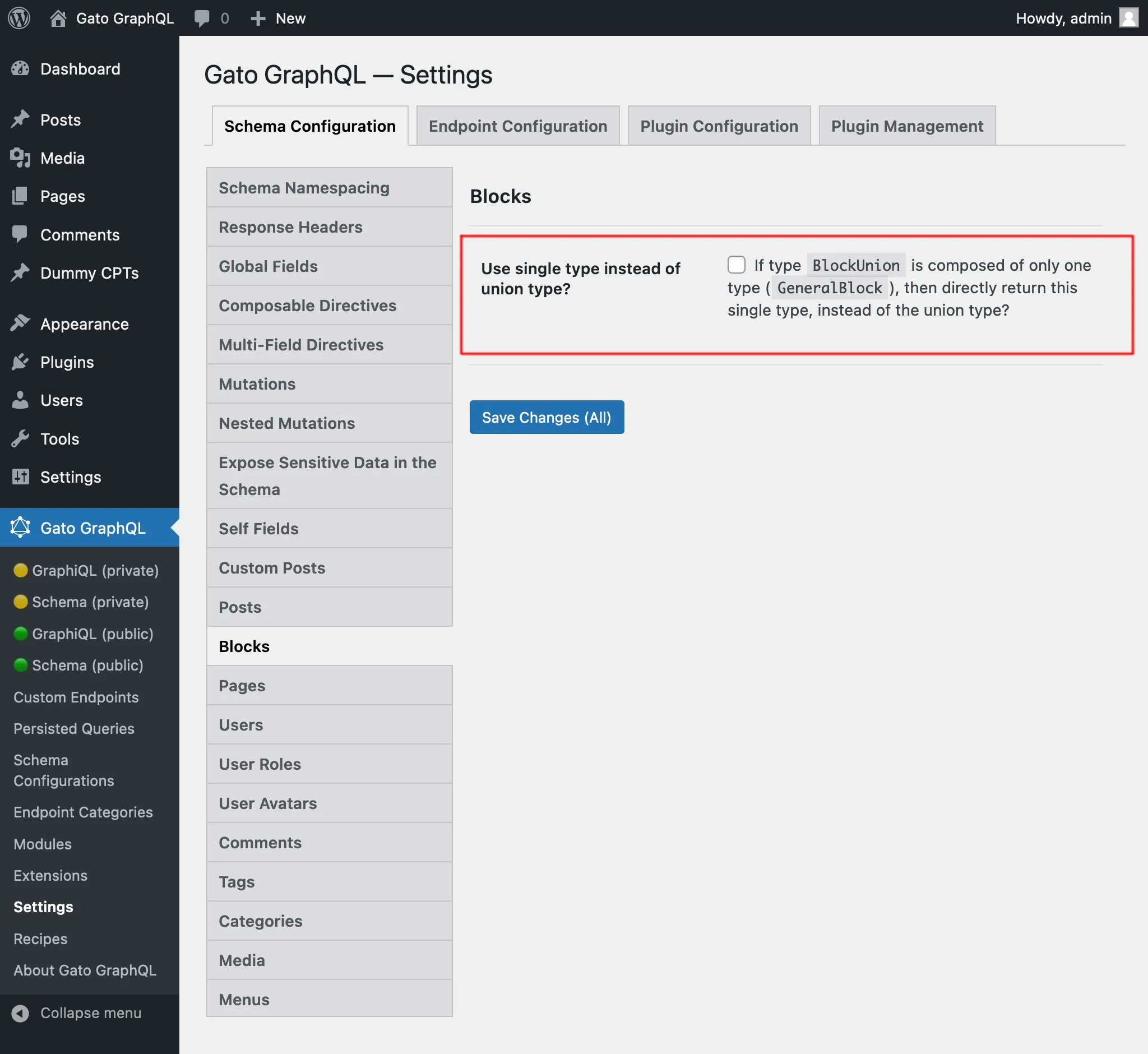
Da es derzeit nur einen Block-Typ gibt, der Bloecke abbildet — GeneralBlock — ist es sinnvoll, dass CustomPost.blocks (und auch Block.innerBlocks) diesen Typ direkt zurueckgibt, anstatt den Typ BlockUnion.
Das laesst sich auf der Einstellungsseite unter dem Tab Blocks tun, indem du die Option Use single type instead of union type? aktivierst:
Danach vereinfacht sich die GraphQL-query:
{
post(by: { id: 1 }) {
blocks {
name
attributes
innerBlocks {
name
attributes
}
}
}
}Beachte, dass die Beibehaltung des Antworttyps als BlockUnion fuer die Vorwaertskompatibilitaet gut ist: Falls wir uns jemals entscheiden sollten, blockspezifische Typen zum Schema hinzuzufuegen (siehe Abschnitt unten), wird es keine Breaking Changes geben.
Blockspezifische Typen abbilden
Der Typ JSONObject (wie von Block.attributes zurueckgegeben) ist nicht streng typisiert: Seine Eigenschaften koennen beliebige Typen und Kardinalitaet haben (String, Int, [Boolean!], usw.), daher muss man diese Informationen fuer jeden Block kennen und jeden Fall auf der Client-Seite behandeln.
Wenn strenge Typisierung benoetigt wird, muss das GraphQL-Schema per PHP-Code erweitert werden, indem blockspezifische Typen hinzugefuegt werden, die die spezifischen Attribute eines Blocks als Felder abbilden, und diese in BlockUnion aufgenommen werden.
Zum Beispiel kann man den Typ CoreParagraphBlock hinzufuegen, der den Block core/paragraph abbildet, mit dem Feld content vom Typ String.
Siehe die Dokumentation in GatoGraphQL/GatoGraphQL, um zu erfahren, wie man das GraphQL-Schema erweitert (derzeit noch in Arbeit).
Bloecke filtern
Das Feld CustomPost.blocks enthaelt das Argument filterBy mit zwei Eigenschaften: include und exclude. Diese koennen verwendet werden, um zu filtern, welche Bloecke nach Blockname abgerufen werden:
{
post(by: { id: 1 }) {
id
blocks(
filterBy: {
include: [
"core/heading",
"core/gallery"
]
}
) {
name
attributes
}
}
}Das liefert:
{
"data": {
"post": {
"blocks": [
{
"name": "core/gallery",
"attributes": {
"linkTo": "none",
"className": "alignnone",
"images": [
{
"url": "https://d.pr/i/zd7Ehu+",
"alt": "",
"id": "1706"
},
{
"url": "https://d.pr/i/jXLtzZ+",
"alt": "",
"id": "1705"
}
],
"ids": [],
"shortCodeTransforms": [],
"imageCrop": true,
"fixedHeight": true,
"sizeSlug": "large",
"allowResize": false
},
"innerBlocks": null
},
{
"name": "core/heading",
"attributes": {
"content": "List Block",
"level": 2
},
"innerBlocks": null
},
{
"name": "core/heading",
"attributes": {
"className": "has-top-margin",
"content": "Columns Block",
"level": 2
},
"innerBlocks": null
},
{
"name": "core/heading",
"attributes": {
"content": "Columns inside Columns (nested inner blocks)",
"level": 2
},
"innerBlocks": null
}
]
}
}
}Beachte, dass nicht alle Bloecke vom Typ core/heading enthalten sind: Diejenigen, die unter core/column verschachtelt sind, wurden ausgeschlossen, da es keine Moeglichkeit gibt, sie zu erreichen (da die Bloecke core/columns und core/column selbst ausgeschlossen sind).
Nachteile des Feldes blocks
Das Feld blocks hat den Nachteil, dass man, um alle Block-Daten des Custom Posts abzurufen — einschliesslich der Daten der inneren Bloecke, deren innerer Bloecke usw. — wissen muss, wie viele verschachtelte Block-Ebenen im Inhalt vorhanden sind, und diese Information in der GraphQL-query widerspiegeln muss.
Oder, falls man das nicht weiss, muss die query mit genuegend Ebenen zusammengestellt werden, um sicherzustellen, dass alle Daten abgerufen werden.
Diese query ruft beispielsweise bis zu 7 Ebenen der Verschachtelung innerer Bloecke ab:
{
post(by: { id: 1 }) {
blocks {
...BlockData
}
}
}
fragment BlockData on Block {
name
attributes
innerBlocks {
...on Block {
name
attributes
innerBlocks {
...on Block {
name
attributes
innerBlocks {
...on Block {
name
attributes
innerBlocks {
...on Block {
name
attributes
innerBlocks {
...on Block {
name
attributes
innerBlocks {
...on Block {
name
attributes
innerBlocks {
...on Block {
name
attributes
}
}
}
}
}
}
}
}
}
}
}
}
}
}
}blockDataItems
Um den Nachteil zu vermeiden, wie das Feld blocks alle Daten abruft (einschliesslich der inneren Bloecke, deren innerer Bloecke usw.), gibt es das Feld CustomPost.blockDataItems.
Dieses Feld gibt statt [BlockUnion] den Typ [JSONObject!] zurueck:
type CustomPost {
blockDataItems: [JSONObject!]
}Anders gesagt: Anstatt dem typischen GraphQL-Ansatz zu folgen, bei dem Entitaeten mit Entitaeten in Beziehung stehen und man durch sie navigiert, liefert jede Block-Entitaet auf oberster Ebene bereits alle Block-Daten fuer sich selbst und alle ihre Kinder in einem einzigen JSONObject-Ergebnis.
Das JSON-Objekt enthaelt die Eigenschaften des Blocks (unter den Eintraegen name und attributes) und die seiner inneren Bloecke (unter dem Eintrag innerBlocks), rekursiv.
Die folgende query zum Beispiel:
{
post(by: { id: 1 }) {
blockDataItems
}
}...liefert:
{
"data": {
"post": {
"blockDataItems": [
{
"name": "core/gallery",
"attributes": {
"linkTo": "none",
"className": "alignnone",
"images": [
{
"url": "https://d.pr/i/zd7Ehu+",
"alt": "",
"id": "1706"
},
{
"url": "https://d.pr/i/jXLtzZ+",
"alt": "",
"id": "1705"
}
],
"ids": [],
"shortCodeTransforms": [],
"imageCrop": true,
"fixedHeight": true,
"sizeSlug": "large",
"allowResize": false
}
},
{
"name": "core/heading",
"attributes": {
"content": "List Block",
"level": 2
}
},
{
"name": "core/list",
"attributes": {
"ordered": false,
"values": "<li>List item 1</li><li>List item 2</li><li>List item 3</li><li>List item 4</li>"
}
},
{
"name": "core/heading",
"attributes": {
"className": "has-top-margin",
"content": "Columns Block",
"level": 2
}
},
{
"name": "core/columns",
"attributes": {
"isStackedOnMobile": true
},
"innerBlocks": [
{
"name": "core/column",
"attributes": {},
"innerBlocks": [
{
"name": "core/image",
"attributes": {
"id": 1701,
"className": "layout-column-1",
"url": "https://d.pr/i/fW6V3V+",
"alt": ""
}
}
]
},
{
"name": "core/column",
"attributes": {},
"innerBlocks": [
{
"name": "core/paragraph",
"attributes": {
"className": "layout-column-2",
"content": "Phosfluorescently morph intuitive relationships rather than customer directed human capital.",
"dropCap": false
}
}
]
}
]
},
{
"name": "core/heading",
"attributes": {
"content": "Columns inside Columns (nested inner blocks)",
"level": 2
}
},
{
"name": "core/columns",
"attributes": {
"isStackedOnMobile": true
},
"innerBlocks": [
{
"name": "core/column",
"attributes": {},
"innerBlocks": [
{
"name": "core/image",
"attributes": {
"id": 1701,
"className": "layout-column-1",
"url": "https://d.pr/i/fW6V3V+",
"alt": ""
}
},
{
"name": "core/columns",
"attributes": {
"isStackedOnMobile": true
},
"innerBlocks": [
{
"name": "core/column",
"attributes": {
"width": "33.33%"
},
"innerBlocks": [
{
"name": "core/heading",
"attributes": {
"fontSize": "large",
"content": "Life is so rich",
"level": 2
}
},
{
"name": "core/heading",
"attributes": {
"level": 3,
"content": "Life is so dynamic"
}
}
]
},
{
"name": "core/column",
"attributes": {
"width": "66.66%"
},
"innerBlocks": [
{
"name": "core/paragraph",
"attributes": {
"content": "This rhyming poem is the spark that can reignite the fires within you. It challenges you to go out and live your life in the present moment as a “hero” and leave your mark on this world.",
"dropCap": false
}
},
{
"name": "core/columns",
"attributes": {
"isStackedOnMobile": true
},
"innerBlocks": [
{
"name": "core/column",
"attributes": {},
"innerBlocks": [
{
"name": "core/image",
"attributes": {
"id": 361,
"sizeSlug": "large",
"linkDestination": "none",
"url": "https://gato-graphql.lndo.site/wp-content/uploads/2022/05/graphql-voyager-public-1024x622.jpg",
"alt": ""
}
}
]
},
{
"name": "core/column",
"attributes": {}
},
{
"name": "core/column",
"attributes": {},
"innerBlocks": [
{
"name": "core/image",
"attributes": {
"id": 362,
"sizeSlug": "large",
"linkDestination": "none",
"url": "https://gato-graphql.lndo.site/wp-content/uploads/2022/05/namespaced-interactive-schema-1024x598.webp",
"alt": ""
}
}
]
}
]
}
]
}
]
}
]
}
]
}
]
}
}
}Block-Datenelemente filtern
Aehnlich wie blocks erlaubt auch blockDataItems das Filtern der abgerufenen Bloecke ueber das Argument filterBy.
Diese query:
{
post(by: { id: 1 }) {
id
blockDataItems(
filterBy: {
include: [
"core/heading"
]
}
)
}
}...liefert:
{
"data": {
"post": {
"blockDataItems": [
{
"name": "core/heading",
"attributes": {
"content": "List Block",
"level": 2
},
"innerBlocks": null
},
{
"name": "core/heading",
"attributes": {
"className": "has-top-margin",
"content": "Columns Block",
"level": 2
},
"innerBlocks": null
},
{
"name": "core/heading",
"attributes": {
"content": "Columns inside Columns (nested inner blocks)",
"level": 2
},
"innerBlocks": null
}
]
}
}
}Beachte, dass aehnlich wie bei blocks nicht alle Bloecke vom Typ core/heading enthalten sind: Diejenigen, die unter core/column verschachtelt sind, wurden ausgeschlossen, da es keine Moeglichkeit gibt, sie zu erreichen (da die Bloecke core/columns und core/column selbst ausgeschlossen sind).
blockFlattenedDataItems
Beide Felder blocks und blockDataItems erlauben es, die abgerufenen Bloecke zu filtern (ueber das Argument filterBy). In beiden Faellen gilt: Wenn ein Block die Einschlussbedingung erfuellt, aber in einem Block verschachtelt ist, der sie nicht erfuellt, wird er ausgeschlossen.
Es gibt jedoch Situationen, in denen man alle Bloecke eines bestimmten Typs aus dem Custom Post abrufen muss, unabhaengig davon, wo sich diese Bloecke in der Hierarchie befinden. Zum Beispiel moechte man vielleicht alle Bloecke vom Typ core/image einschliessen, um alle Bilder abzurufen, die in einem Blog-Beitrag enthalten sind.
Um diesem Bedarf gerecht zu werden, gibt es das Feld CustomPost.blockFlattenedDataItems. Im Gegensatz zu den Feldern blocks und blockDataItems flacht es die Block-Hierarchie auf eine einzige Ebene ab.
Diese query:
{
post(by: { id: 1 }) {
blockFlattenedDataItems
}
}...liefert:
{
"data": {
"post": {
"blockFlattenedDataItems": [
{
"name": "core/gallery",
"attributes": {
"linkTo": "none",
"className": "alignnone",
"images": [
{
"url": "https://d.pr/i/zd7Ehu+",
"alt": "",
"id": "1706"
},
{
"url": "https://d.pr/i/jXLtzZ+",
"alt": "",
"id": "1705"
}
],
"ids": [],
"shortCodeTransforms": [],
"imageCrop": true,
"fixedHeight": true,
"sizeSlug": "large",
"allowResize": false
},
"innerBlockPositions": null,
"parentBlockPosition": null
},
{
"name": "core/heading",
"attributes": {
"content": "List Block",
"level": 2
},
"innerBlockPositions": null,
"parentBlockPosition": null
},
{
"name": "core/list",
"attributes": {
"ordered": false,
"values": "<li>List item 1</li><li>List item 2</li><li>List item 3</li><li>List item 4</li>"
},
"innerBlockPositions": null,
"parentBlockPosition": null
},
{
"name": "core/heading",
"attributes": {
"className": "has-top-margin",
"content": "Columns Block",
"level": 2
},
"innerBlockPositions": null,
"parentBlockPosition": null
},
{
"name": "core/columns",
"attributes": {
"isStackedOnMobile": true
},
"innerBlockPositions": [
5,
7
],
"parentBlockPosition": null
},
{
"name": "core/column",
"attributes": {},
"parentBlockPosition": 4,
"innerBlockPositions": [
6
]
},
{
"name": "core/image",
"attributes": {
"id": 1701,
"className": "layout-column-1",
"url": "https://d.pr/i/fW6V3V+",
"alt": ""
},
"parentBlockPosition": 5,
"innerBlockPositions": null
},
{
"name": "core/column",
"attributes": {},
"parentBlockPosition": 4,
"innerBlockPositions": [
8
]
},
{
"name": "core/paragraph",
"attributes": {
"className": "layout-column-2",
"content": "Phosfluorescently morph intuitive relationships rather than customer directed human capital.",
"dropCap": false
},
"parentBlockPosition": 7,
"innerBlockPositions": null
},
{
"name": "core/heading",
"attributes": {
"content": "Columns inside Columns (nested inner blocks)",
"level": 2
},
"innerBlockPositions": null,
"parentBlockPosition": null
},
{
"name": "core/columns",
"attributes": {
"isStackedOnMobile": true
},
"innerBlockPositions": [
11
],
"parentBlockPosition": null
},
{
"name": "core/column",
"attributes": {},
"parentBlockPosition": 10,
"innerBlockPositions": [
12,
13
]
},
{
"name": "core/image",
"attributes": {
"id": 1701,
"className": "layout-column-1",
"url": "https://d.pr/i/fW6V3V+",
"alt": ""
},
"parentBlockPosition": 11,
"innerBlockPositions": null
},
{
"name": "core/columns",
"attributes": {
"isStackedOnMobile": true
},
"parentBlockPosition": 11,
"innerBlockPositions": [
14,
17
]
},
{
"name": "core/column",
"attributes": {
"width": "33.33%"
},
"parentBlockPosition": 13,
"innerBlockPositions": [
15,
16
]
},
{
"name": "core/heading",
"attributes": {
"fontSize": "large",
"content": "Life is so rich",
"level": 2
},
"parentBlockPosition": 14,
"innerBlockPositions": null
},
{
"name": "core/heading",
"attributes": {
"level": 3,
"content": "Life is so dynamic"
},
"parentBlockPosition": 14,
"innerBlockPositions": null
},
{
"name": "core/column",
"attributes": {
"width": "66.66%"
},
"parentBlockPosition": 13,
"innerBlockPositions": [
18,
19
]
},
{
"name": "core/paragraph",
"attributes": {
"content": "This rhyming poem is the spark that can reignite the fires within you. It challenges you to go out and live your life in the present moment as a “hero” and leave your mark on this world.",
"dropCap": false
},
"parentBlockPosition": 17,
"innerBlockPositions": null
},
{
"name": "core/columns",
"attributes": {
"isStackedOnMobile": true
},
"parentBlockPosition": 17,
"innerBlockPositions": [
20,
22,
23
]
},
{
"name": "core/column",
"attributes": {},
"parentBlockPosition": 19,
"innerBlockPositions": [
21
]
},
{
"name": "core/image",
"attributes": {
"id": 361,
"sizeSlug": "large",
"linkDestination": "none",
"url": "https://gato-graphql.lndo.site/wp-content/uploads/2022/05/graphql-voyager-public-1024x622.jpg",
"alt": ""
},
"parentBlockPosition": 20,
"innerBlockPositions": null
},
{
"name": "core/column",
"attributes": {},
"parentBlockPosition": 19,
"innerBlockPositions": null
},
{
"name": "core/column",
"attributes": {},
"parentBlockPosition": 19,
"innerBlockPositions": [
24
]
},
{
"name": "core/image",
"attributes": {
"id": 362,
"sizeSlug": "large",
"linkDestination": "none",
"url": "https://gato-graphql.lndo.site/wp-content/uploads/2022/05/namespaced-interactive-schema-1024x598.webp",
"alt": ""
},
"parentBlockPosition": 23,
"innerBlockPositions": null
}
]
}
}
}Beachte, wie das Attribut innerBlocks verschwunden ist, da die Bloecke nicht mehr verschachtelt sind. An seiner Stelle enthaelt die Antwort zwei weitere Attribute (die es uns ermoeglichen, die Block-Hierarchie wiederherzustellen):
parentBlockPosition: Die Position des uebergeordneten Blocks innerhalb des zurueckgegebenen Arrays, odernull, wenn es sich um einen Block der obersten Ebene handeltinnerBlockPositions: Ein Array mit den Positionen der inneren Bloecke des Blocks innerhalb des zurueckgegebenen Arrays
Die abgeflachten Block-Datenelemente filtern
Da die Block-Hierarchie nun abgeflacht ist, liefert das Filtern nach core/heading alle diese Bloecke (auch wenn einer davon urspruenglich unter einem ausgeschlossenen Block verschachtelt war).
Diese query:
{
post(by: { id: 1 }) {
id
blockFlattenedDataItems(
filterBy: {
include: [
"core/heading"
]
}
)
}
}...liefert:
{
"data": {
"post": {
"blockFlattenedDataItems": [
{
"name": "core/heading",
"attributes": {
"content": "List Block",
"level": 2
}
},
{
"name": "core/heading",
"attributes": {
"className": "has-top-margin",
"content": "Columns Block",
"level": 2
}
},
{
"name": "core/heading",
"attributes": {
"content": "Columns inside Columns (nested inner blocks)",
"level": 2
}
},
{
"name": "core/heading",
"attributes": {
"fontSize": "large",
"content": "Life is so rich",
"level": 2
}
},
{
"name": "core/heading",
"attributes": {
"level": 3,
"content": "Life is so dynamic"
}
}
]
}
}
}Beachte, dass die beiden zusaetzlichen Attribute parentBlockPosition und innerBlockPositions beim Filtern entfernt werden, da sie keinen Sinn mehr ergeben.